Overview#
It’s easy to reach for addEncodedQuery() when filtering GlideRecord calls, you can grab them directly from the condition builder and can build them with like joining together multiple conditions with a queries.join('^OR'). It’s also deceptively risky. Developers are often warned about sanitizing user inputs, but the encodedQuery is a place where it may not be obvious that you need to be concerned. If you concatenate user inputs into a addEncodedQuery(), your query is vulnerable.
How the Injection Works#
Encoded Query Control Tokens#
The encoded query language is built out of control tokens. ^ is AND, ^OR is OR, and ^NQ (new query) starts a fresh query. ^NQ is useful since it lets you combine the outputs of two independent queries, but also opens the door to easy query circumventions. Since in query strings, the control tokens are mixed with the user’s inputs, a user supplied value can easily blur the lines between their input and the query you intended to build. If someone includes a ^NQ in their input, then you are no longer filling in a value, but instead changing the structure/intent of the query.
The Filter You Think You Wrote#
Here is an example of a pattern that feels safe and is not. You want users to search, but only within a scope they are allowed to see, so you prepend a security condition and append their input:
var me = gs.getUserID();
var gr = new GlideRecord('incident');
gr.addEncodedQuery('assigned_to=' + me + '^' + 'short_descriptionLIKE' + userFilter);
gr.query();
The assumption is that assigned_to=me constrains everything that follows. It does not.
Why ^NQ Wins#
The token that breaks this is ^NQ. Because it starts a new query that is included alongside the prior conditions, a user only has to begin their input with it. Say they submit:
^NQactive=true^ORactive=falseYour string becomes:
assigned_to=<me>^short_descriptionLIKE^NQactive=true^ORactive=falseWhich the parser reads as:
(assigned_to=<me> AND short_descriptionLIKE) OR (active=true OR active=false)By writing a query like active=trueORactive=false, the user has totally circumvented whatever query you had written. Maybe not a big deal in business logic, but if you are using GlideRecord and a specific query to protect what can be retrieved you have created a huge security hole. The ^NQ threw your assigned_to scope away. There is no value you can prepend that survives this, because ^NQ resets the board on purpose.
^OR or ^NQ can widen straight back out.Seeing It on a Live Instance#
This is not theoretical. Here is the comparison on a stock instance: the same scope and the same hostile string, run once through addEncodedQuery and once through addQuery.
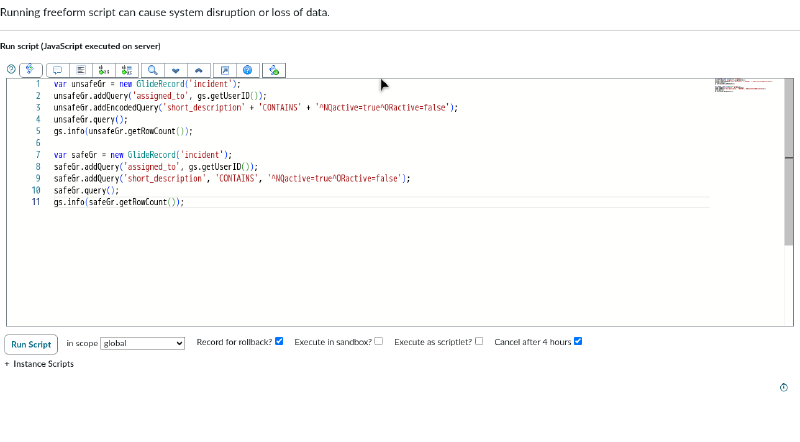
Run it, and the row counts tell the whole story.
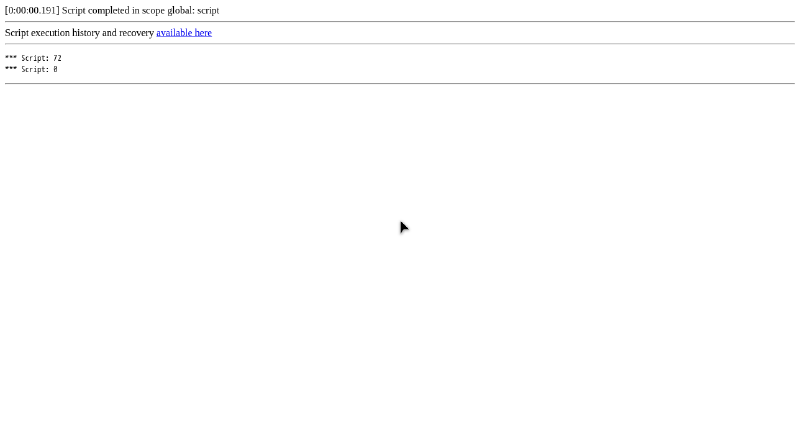
The first line is the unsafe addEncodedQuery version: 72 rows, which is every incident in the table. The injected ^NQ discarded the assigned_to scope and the tautology matched everything. The second line is the safe addQuery version: 0 rows, because the caret string was compared as a literal value inside short_description and nothing contains it. Same input, same intended scope, and the only thing that changed is which method received the user’s text.
Why You Can’t Patch/Filter Around It#
Blacklisting ^ or NQ is a losing game. The encoded query language has a long list of operators, the matching is more forgiving than you might like, and there is a far nastier vector hiding in it. Trying to enumerate and strip every dangerous form just isn’t feasible, and instead you should reach for addQuery.
The Fix#
The fix here is simple, either make sure you are ok with the user widening the query and back it up with ACLs via GlideRecordSecure or just use addQuery which correctly keeps the two separate.
Build Conditions With addQuery#
For the query structure, use addQuery(field, operator, value). The value is stored as a discrete parameter and never re-parsed as query language, so a ^NQ inside it is literal text that matches nothing dangerous. That is the safe column you just saw return 0. Build each user driven condition as its own addQuery call, with the field and operator whitelisted against a known set rather than taken raw.
var gr = new GlideRecord('incident');
gr.addQuery('assigned_to', me);
gr.addQuery('short_description', 'CONTAINS', userInput); // userInput is data, not syntax
gr.query();
Enforce the Boundary With ACLs#
For the actual security boundary, lean on ACLs, not on the shape of the query. Use GlideRecordSecure so that even if a query is broadened, by injection or just by mistake, the platform still refuses to hand back rows the running user has no rights to. That is the line that holds, because it does not depend on the query staying the shape you wrote it. This still may cause havoc in business logic if you are performing an action in matching cases.
Takeaways#
If any part of an encoded query comes from a user, you do not have a secure filter, you have an editable one. Reserve addEncodedQuery() for static strings you authored yourself. Build user driven conditions with addQuery(field, operator, value) and whitelist the field and operator. And put the real boundary where it belongs, in ACL enforcement through GlideRecordSecure or addUserQuery(), because a query condition was never going to hold that line on its own.